
Synergist release notes
In this release:
Synergist v15 | Nov 25
We've been listening to your feedback and building features that solve real agency challenges. Whether you're a project manager juggling timelines, a finance team tracking profitability across departments, or an admin managing permissions and settings, v15 has something that'll make your day smoother.
Explore the latest Synergist features...
 Jobs
Jobs
Estimates with clearer totals
If you're using the new optional phases we released in v14, your estimates will now show three totals at a glance: Total for non-optional phases, Total for optional phases and grand total.
Create tasks directly in Gantt charts
Add new tasks to jobs, phases, and stages directly from the Gantt chart. Click the plus button to the right of any phase or stage to add your task details – all without leaving the Gantt view.
Note: Only task types marked as 'Show on Gantt charts' appear in the 'Task type' dropdown menu. See Task types for more information.
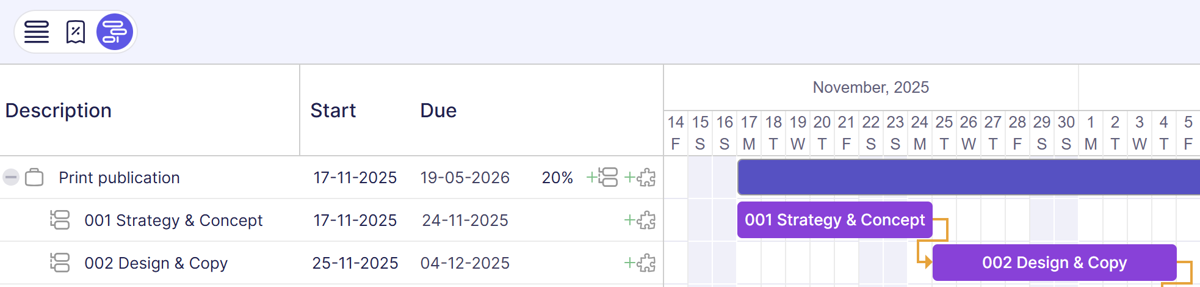
Reorder tasks in Gantt charts
Reorder tasks directly in your Gantt chart by dragging them up or down. Tasks stay within their parent phase or stage – you can't drag a task from one phase to another.
To enable: Select 'Enable task ordering' in the Gantt 'Preferences'. Switching this off resets tasks back to date order.
Note: This feature isn't available in the Phases list Gantt (read-only view).
See our help article for more details: Editing Gantt charts
Override Gantt and Kanban visibility for individual tasks
You can now control whether individual tasks appear on Gantt charts or Kanban boards, overriding the default task type settings.
In the task detail page, you'll find 'Kanban' and 'Gantt' checkboxes under 'Override task type settings'. Tick either checkbox to reveal 'Show' or 'Hide' options for that specific task. Unticking the checkbox resets the task back to the default task type setting from File Maintenance.
For more information, see our Show tasks in Resource Bookings help article.
Improved Gantt chart tooltips
Hover over any item in a Gantt chart to see the key details – including client and job/phase/stage info – no more double-clicking required.
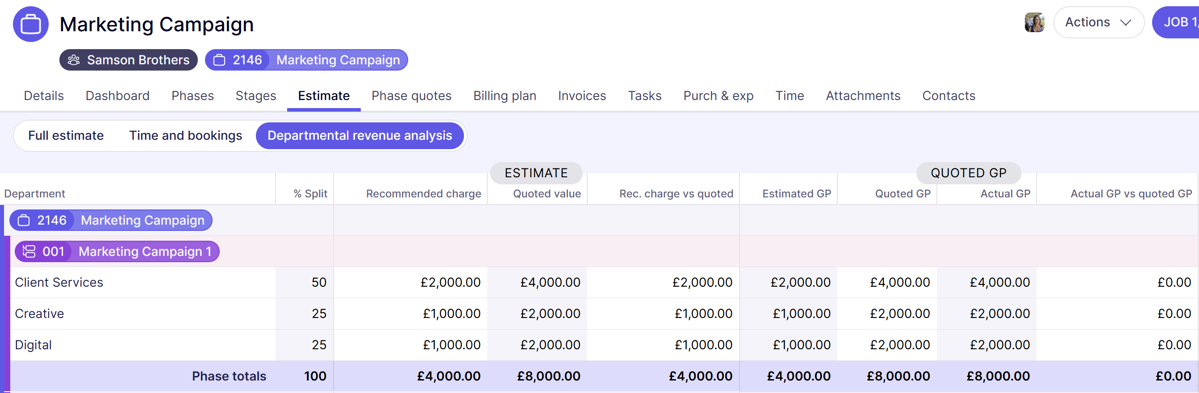
Enhanced departmental revenue analysis
The departmental revenue analysis screen now also includes gross profit metrics: estimated, quoted, and actual GP, plus variance between actual and quoted. View these new metrics by department at job and phase levels.
See the Departmental revenue analysis help article for more details.
* Available with Professional and Enterprise subscriptions.
Job/phase Time tab improvements
'Total cost' and 'Total charge' totals now appear on the Time tab for jobs and phases – giving you the complete financial picture at a glance.
Additional time views: 'This month' and 'Last month' are now available on the Time tab for jobs, phases, and stages. These views appear when you select either 'Pending' or 'Timesheets', making it easier to review recent time entries.
Project and campaign numbers now visible in lists
A new sortable 'Project number' column has been added to the Project list, making it easier to search and sort by project number. The project number also now appears as a read-only field on the project record.
Similarly, a new sortable 'Campaign number' column has been added to the Campaign list, with the campaign number also appearing as a read-only field on the campaign record.
Track who marked organisations as inactive
Hover over the 'INACTIVE' pill on an organisation to see who marked it inactive and when.
Streamlined Jobs tab on sales orders
The 'Job summary' and 'Job details' tabs on organisation sales orders have been merged into a single 'Jobs' tab, combining all job information into one convenient table.
 Resourcing
Task list enhancements
Add 'Preferred resource' to Task list views, making it easier to see who's best suited for upcoming work.
Move bookings improvements
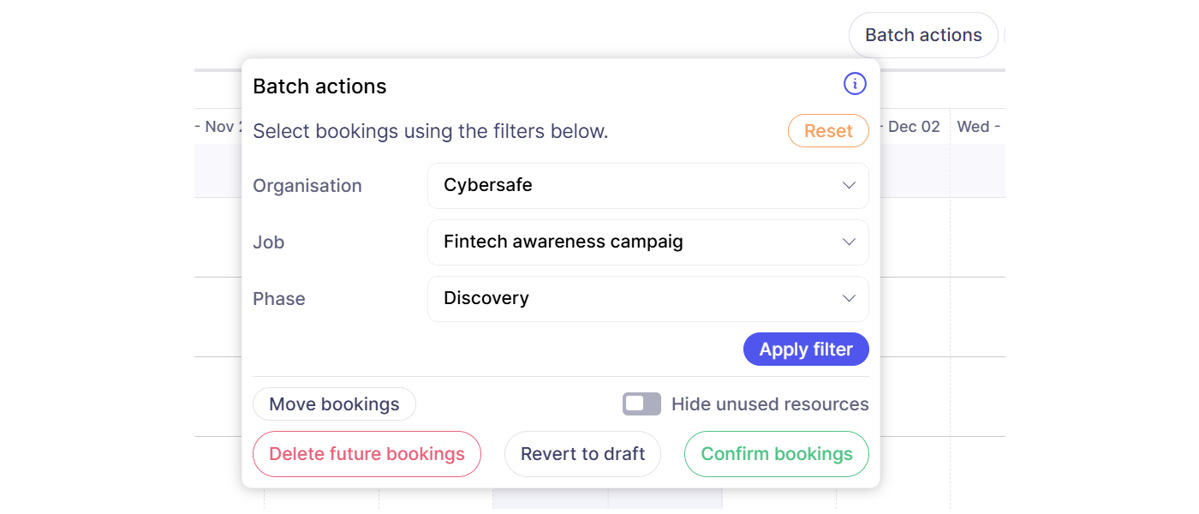
A new 'Batch actions' button filters bookings based on Client, Job, Phase or Stage, and lets you update them in a single click to show, move, change their status or delete them.
When moving bookings, you can now select a target week from a calendar picker. The system automatically calculates how many weeks to move the booking forward, saving you from manual calculations. If the selected week is less than 7 days away, the booking is moved by 1 week at a minimum.
Enhanced calendar synchronisation
Choose exactly which users sync with Google or Office 365 calendars. Not everyone needs calendar integration – now you can be selective.
See our help articles for more details:
Include/exclude users from calendar sync
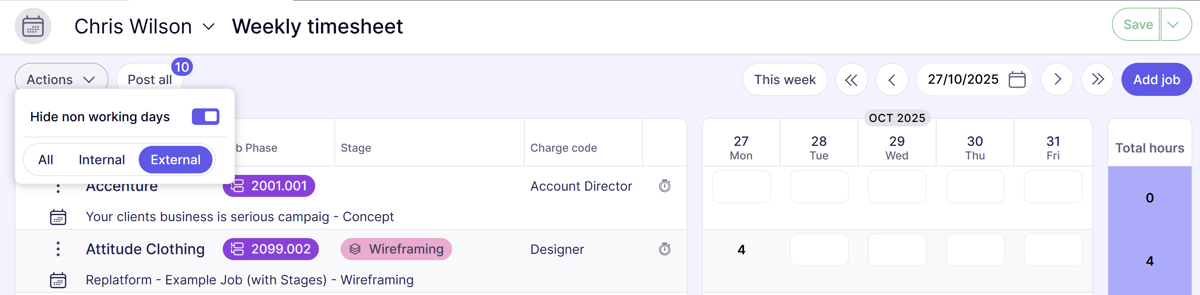
Hide non working days on timesheets
In weekly timesheets, there's a new option under the 'Actions' menu to 'Hide non working days'. When selected, non-working days (including weekends) are hidden, keeping your interface cleaner and focused on working days only.
If hours are entered against a non-working day, that day will still display in your weekly timesheet, so you don't lose visibility of the entry.
Due by time for work requests in MyCalendar
Due dates and times for work requests now appear in MyCalendar, giving you more precise deadline management.
 Financials
AI autofill from purchase invoices
Upload your purchase invoice (jpeg, png, tiff, or pdf) and AI automatically extracts and fills in the supplier reference, invoice value and date. Auto-filled fields are highlighted on screen so you can review them before submitting the purchase invoice.
See Purchase invoice autofill help article for more details
*Only available for Synergist Cloud customers
Billing plan grand totals
Billing plans now display a 'Grand totals' row instead of 'Page totals', giving you the complete financial picture at a glance rather than totals per page.
Purchase order list enhancements
Get better visibility into purchase order status and outstanding amounts at a glance. The Purchase Order (PO) list now includes additional columns you can add to your view:
- Purchase invoice value – shows the total value invoiced against the purchase order
- Balance – shows the remaining purchase order balance to be allocated to a purchase invoice in the base currency
- Currency balance – shows the remaining purchase order balance to be allocated to a purchase invoice in the PO's currency
Draft invoice warnings now appear earlier
Catch draft invoice errors earlier with warning messages that appear when you tick the 'Ready for approval' checkbox – before you click 'Make real'.
To enable: In Company Settings > 'Switches' tab > 'Sales invoicing' panel > Tick 'Enable draft approval' then tick 'Allow ready for approval warnings'.
VAT code mismatch warnings on invoices
Draft invoices now display a warning icon on the Address tab if the bill-to organisation's default VAT code differs from the VAT codes on invoice lines and account analysis.
Clicking the icon will convert all VAT codes on the draft invoice to match the organisation's default.
Expanded Sage Intacct integration
Our Sage Intacct integration is now more comprehensive:
- Sales invoices, credits, purchase invoices, and expense attachments are automatically sent to Sage Intacct via the API when a transaction is posted.
- Import purchase and expense files from Sage Intacct, with the ability to filter by status (e.g., Draft, Submitted). Less manual data transfer between systems, more confidence in your financial records.
- Get sales and purchase tax codes from Sage Intacct via API
 Reporting
Sticky columns in Data Analytics
Pin columns in place as you scroll horizontally, just like Excel's freeze panes. Keep key identifiers visible as you explore your data.
Holidays built into required and target hours in Data Analytics
Required and target hours now automatically account for holidays booked into the Resource bookings calendar when calculating resource availability. This means your charts and tables in Data Analytics reflect accurate capacity, without needing manual adjustments for time off.*
For example, if a designer is 40 hours per week (required hours) with a 75% utilisation target and they're booked out for 1 day (8 hours) "holiday" in the calendar, that will reduce their required hours by 8 and their target hours by 6.
*Note: If you have existing Data Analytics reports set up, you'll likely need to remove any custom calculations relating to holidays as a result of this update.
Contextual help on dashboards
Every dashboard now features a help icon (?) that opens relevant support articles in a new browser tab. Get instant explanations of dashboard panels without leaving your workflow – available on main dashboards as well as organisation, job, and phase dashboards.
 System admin
Multi-factor authentication - trusted device
Save trusted devices so users can skip MFA prompts on their regular work devices for a set number of days.
- To enable: In System Parameters, set the 'Device trust (days)' field to your preferred number of days (e.g., 30). Setting it to '0' disables the feature.
- For users: When logging in with MFA enabled, tick the checkbox 'Don't ask again on this device for ... days' to trust that device for the specified period.
This balances security with convenience – no constant MFA prompts on trusted devices while maintaining protection on new or unrecognised devices.
See the MFA Trusted device help article for more details.
Filter user groups by area of use
The User groups list in File maintenance now includes an 'Area of use' dropdown filter, making it easier to filter specific user groups quickly.
Control purchase invoice approval notifications
A new alert setting lets purchase invoice creators receive an email or notification when their invoices are approved.
In Company Settings > Alerts tab (available when purchase invoice authorisation is enabled), you'll find 'Alert PI creator on PI authorisation'.
Note: This is active by default, meaning creators receive email alerts or notifications when their purchase invoices are authorised. Turn it off to stop these notifications.
Final invoice permission control
We've updated write-off permissions on the user or group record (Permissions tab) to include control over marking invoices as final:
- 'Add a write off' now reads 'Add a write off and mark invoice as final'
- 'Edit a write off' now reads 'Edit a write off and mark invoice as final'
If a user doesn't have these permissions, the 'Final invoice' checkbox on draft invoices will be greyed out and inaccessible.
See our Amending user permissions help article for more information.
and more...
In-app notifications
Stay informed about product updates, release notes, webinar invites, and admin information – all within Synergist.
You can now flag specific users as super users to ensure they receive all relevant notifications and communications – perfect for system champions and department leads who need to stay on top of everything. To set a super user: In File Maintenance, open the user record and select 'Super user' from the 'User category' dropdown.
See our help articles for more details:
What's next?
This is just the start. We’re planning regular updates to keep improving your user experience and bringing feature enhancements to make the Synergist even better!
We have a raft of new features and integrations planned, and we’ll be continuing with the UX overhaul of each functional area, incorporating feedback from our clients.
Watch this space!